How To Properly And Safely Set Up An Outdoor Server Cabinet
Views: 0 Author: Renny Publish Time: 2026-02-28 Origin: Site
Introduction — Why Proper Setup of an Outdoor Server Cabinet Matters
Deploying a server cabinet indoors is straightforward, but moving it outdoors introduces many environmental challenges: temperature fluctuations, direct sunlight, rain, dust, lightning, and unstable power.
A well-designed outdoor server cabinet is more than a metal enclosure — it’s a miniature outdoor data center. Improper setup can lead to equipment overheating, reduced lifespan, or system failure.
This article walks you through the key steps to safely and efficiently set up an outdoor server cabinet, including structural planning, thermal management, power integration, and long-term operation.
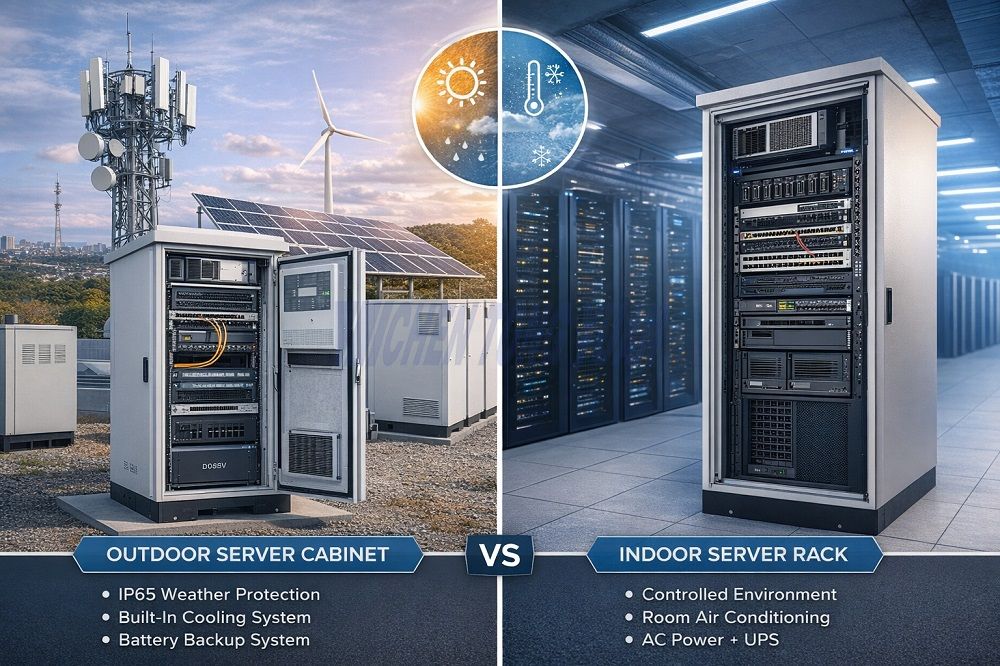
Key Differences Between Outdoor Server Cabinets and Indoor Racks
Environmental Adaptability
Indoor server racks rely on controlled, stable conditions.
Outdoor server cabinets must withstand extreme temperatures, moisture, dust, and corrosion.
Cooling and Thermal Management
Indoor racks rely on room air conditioning.
Outdoor cabinets require integrated cooling systems, such as air conditioners or heat exchangers, to maintain optimal operating temperatures.
Power Systems
Indoor: AC power + UPS
Outdoor: May need battery backup, hybrid power systems, or energy storage integration for unattended operation.
Step 1 — Cabinet Structure and Site Preparation
Foundation and Securing the Cabinet
Use concrete pads or steel supports
Elevate to prevent water accumulation
Bolt down to prevent tipping
Site Selection Guidelines
Avoid low-lying or flood-prone areas
Avoid direct sunlight or high wind zones
Leave enough space for maintenance access
The placement of an outdoor server cabinet determines long-term maintenance costs and system safety.
Step 2 — Equipment Layout and Load Planning
Placing Heavy Equipment at the Bottom
Battery storage modules, UPS units, and main power supplies should be positioned at the base
Ensures a low center of gravity and stability
Placing Lighter Equipment on Top
Network switches, routers, and small servers can be mounted higher
Easier access for maintenance and cable management
Cable and Airflow Management
Use vertical cable management
Separate power and data lines
Ensure airflow is unobstructed to maximize thermal efficiency
Proper equipment layout can increase internal airflow efficiency by up to 30%.
Step 3 — Thermal Management and Cooling System Selection
Thermal management is the most critical factor in outdoor server cabinet operation. Overheating can damage equipment or shorten lifespan.
Calculating Thermal Load
Total power of all equipment inside the cabinet
Include environmental factors like sunlight and ambient temperature
Determine required cooling capacity
Cooling System Options
Air Conditioning Systems
Ideal for high-power density and hot climates
Precise temperature control, stable operation
Supports remote monitoring
Heat Exchangers
High energy efficiency
Suitable for moderate power loads
Low maintenance
Ventilation Systems
Suitable for mild climates or low-load scenarios
Use filters for dust and moisture protection
Choosing the wrong cooling system may lead to internal overheating, severely impacting equipment lifespan.
Step 4 — Power and Energy Storage Integration
Outdoor cabinets often support telecom or edge computing applications, requiring reliable power.
AC Power and UPS
Ensures uninterrupted operation
Protects equipment from voltage fluctuations and power outages
Battery and Energy Storage Systems
Integration of 48V lithium batteries or energy storage modules
Supports hybrid power systems (solar + mains + battery)
Equipped with BMS systems for safety and stability
Proper power and storage integration transforms an outdoor server cabinet into an autonomous miniature data center.
Step 5 — Safety and Long-Term Maintenance
Grounding and Lightning Protection
Dedicated grounding system
Surge protection devices (SPD)
Lightning arresters
Protective Measures
Dust and water seals
Corrosion-resistant coatings
Three-point locking and remote access control
Operations and Inspection
Inspect temperature control and cooling systems every 3–6 months
Clean air filters
Check battery systems and wiring integrity
Regular maintenance ensures long-term stability of an outdoor server cabinet.
Common Installation Mistakes to Avoid
Ignoring thermal load calculation
Placing cabinet too close to walls or obstacles
Failing to isolate batteries and power supplies
Not leaving room for expansion
Underestimating environmental corrosion impact
Most failures are due to installation and planning mistakes rather than equipment defects.
Outdoor Server Cabinet Applications in Telecom and Energy Storage
5G base stations
Edge computing sites
Smart city nodes
Distributed energy storage stations
An outdoor server cabinet is not just a storage box — it integrates power, cooling, storage, and networking into a single outdoor micro data center.
Frequently Asked Questions
1. Does an outdoor server cabinet need an air conditioner?
High-power or sealed cabinets require air conditioning or heat exchangers for stable temperature control.
2. How is an outdoor cabinet made waterproof?
IP55 or higher, combined with sealing strips, drainage channels, and corrosion-resistant materials.
3.How do you calculate the cooling load for an outdoor cabinet?
Total power of installed equipment plus environmental factors such as sunlight and ambient temperature.
4.Can energy storage batteries be integrated into outdoor cabinets?
Yes, with BMS-controlled lithium batteries. They can work with mains or solar power in hybrid setups.
5.What is the difference between IP55 and IP65?
IP65 provides higher protection against dust and water, but may slightly reduce airflow efficiency; selection depends on cooling design.
Conclusion
Properly setting up an outdoor server cabinet is not just about installation — it is a system engineering project.
Consider:
Structural stability
Thermal management
Power and energy storage integration
Protection level and security
Long-term maintenance
Treat the cabinet as a complete system, and you can ensure safe and reliable operation for years to come.
Remember: an outdoor server cabinet is a miniature outdoor data center that protects your equipment and ensures system reliability.